- Le Digital Marketer
- Posts
- Revolutionize Your QR Game: Canva & AI Join Forces!
Revolutionize Your QR Game: Canva & AI Join Forces!
Elevate Your Business Branding with Stylish QR Codes

Bellamy Rodford
August 31, 2023
We’ve just crossed 300 subscribers!
If you’re new here, welcome to the best coverage of AI tools, news & prompts. If you’re a long-time subscriber, welcome back! I’m incredibly grateful for everyone’s support and feedback.
QR codes have become a staple in our digital age. They're everywhere - from restaurant menus to event tickets. But let's be honest, they're not the most visually appealing. What if you could transform that mundane QR code into a captivating piece of art? With Canva, you can! Here's a quick guide on how to do it.
Here’s how to create amazing QR codes with Canva:
Step 1: Dive into Canva's App Section
Begin by navigating to the App section on Canva. This is where all the magic happens!
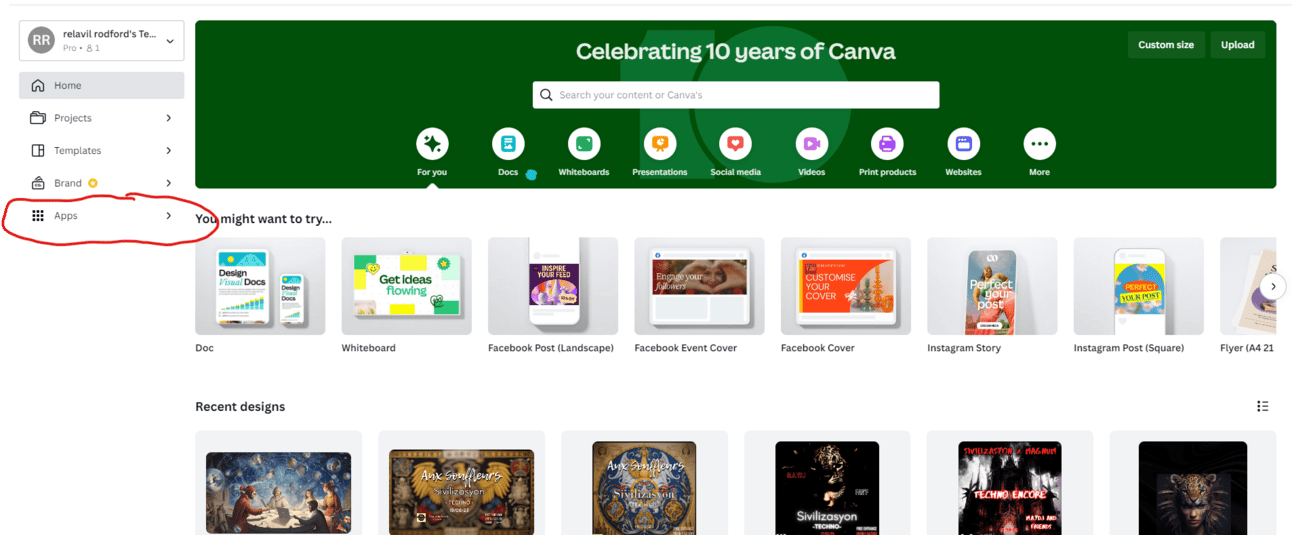
Step 2: Search for "Mojo"
Once you're in the App section, type in "Mojo" in the search bar. This is the tool that will help you elevate your QR code game.

Step 3: Enter Your Prompt
After opening Mojo, you'll be prompted to enter your details. This is where you'll start the customization process.

Step 4: Get Creative with Your Art Style
Now comes the fun part! Choose an art style that resonates with you. Whether you're looking for something minimalist, abstract, or vibrant, Canva has got you covered.
Step 5: Adjust to Your Liking
Feel free to change the aspect ratio to fit your desired platform or medium. But remember, the main goal here is to create a stunning QR art.
Step 6: Input Your URL and Create!
In the QR art section, input the URL you want your QR code to direct to. Once that's done, hit "Create Masterpiece". Voilà! You now have a functional and aesthetically pleasing QR code. When scanned, it will lead someone straight to your chosen website.

Incorporating art into everyday tools like QR codes not only makes them more appealing but also more memorable. So, the next time you're thinking of using a QR code, remember this guide and give it an artistic twist.
Caution
If your QR code is not being generated and you get an error message try removing the htpps infront of your link
Here is some news related to AI that may be helpful for you.
7 AI Tools Every Digital Marketer Needs to Boost Their ROI in 2023
1. Jasper ai - Create high-quality content, ads, and emails with the power of AI.
2. AdEspresso - Automate your social media ad campaigns and get better results.
3. BuzzSumo - Find the most shared content in… twitter.com/i/web/status/1…
— Bellamy (@lebellamyde)
4:30 AM • Aug 29, 2023
Remote work is the future.
You can Earn $1,000 per week
Here are 14 websites offering $700 to over $1,500/m for Remote Jobs
— Tulsi Soni (@shedntcare_)
8:53 AM • Aug 28, 2023
✨ New Feature: Runway Motion Slider
I have been waiting for this feature for a long time! We can finally control how much movement @runwayml adds to our images.
This feature will save me a lot of iterations in the future! I'm especially excited for the lower motion values!
— Nicolas Neubert (@iamneubert)
8:57 AM • Aug 30, 2023
8 Powerful AI tools You Should Bookmark:
1. AI YouTube Summaries
— eightify.app2. FREE AI Talking Avatar
— bit.ly/3sw1mcK3. Create on X (aka Twitter)
— postwise.ai/?_get=home4. Professional LinkedIn Headshots
— tryleap.ai/?ref=Profile5. Midjourney… twitter.com/i/web/status/1…
— Poonam Soni (@CodeByPoonam)
6:49 AM • Aug 30, 2023
If you work as a cleaner, you've got a new competitor.
It's an AI robot.
....and probably does a better cleaning job than most humans.
— Rowan Cheung (@rowancheung)
11:09 AM • Aug 30, 2023
Reply