- Le Digital Marketer
- Posts
- The essential Guide to Using Midjourney Prompts for Business
The essential Guide to Using Midjourney Prompts for Business
Learn the enssentials of Midjourney

Bellamy Rodford
June 20, 2023

In today's rapidly evolving world, the realm of image generation has reached new heights with the emergence of groundbreaking technologies like Midjourney. As a savvy business, understanding and harnessing the power of Midjourney can unlock a wealth of opportunities to elevate your marketing materials, product designs, and brand imagery.
In this comprehensive guide, we will delve into various techniques and advanced strategies to maximize the potential of Midjourney prompts, enabling you to create captivating and resonant images that truly resonate with your target audience.
Introducing Midjourney: A Game-Changing Text-to-Image Generation App
If you're unfamiliar with Midjourney, allow us to enlighten you. Midjourney is a cutting-edge text-to-image generation app that stands at the forefront of technological innovation, much like OpenAI's DALLE-2 and Stable Diffusion's DreamStudio. This remarkable tool utilizes a vast collection of over 650 million internet-sourced images, transforming textual prompts into visually striking masterpieces.
While currently in its beta phase, Midjourney continues to rapidly evolve, consistently introducing new features and pushing the boundaries of what's possible. Exciting prospects lie ahead, as the current version of Midjourney's AI engine, v4, promises even greater advancements.
Getting Started: Unleash the Power of Midjourney Bot on Discord for Custom Image Generation
Are you ready to embark on a journey of creating custom images from simple text prompts using the Midjourney Bot on Discord? Our quick start guide will walk you through the process step by step, ensuring a seamless and empowering experience.
Step 1: Log In To Your Discord Account
Accessing the Midjourney Bot is a breeze. Whether you prefer the web version, mobile app, or desktop application, Discord offers multiple options to suit your preferences. Before joining the Midjourney Discord server, make sure you have a verified Discord account. If you haven't created an account yet or need assistance with verification, refer to Discord's official guides for detailed instructions.

Step 2: Subscribe to a Midjourney Plan
To unlock the full potential of Midjourney, visit Midjourney.com/account and sign in using your verified Discord account. On the account page, you'll have the opportunity to upgrade or downgrade your plan based on your specific requirements. For detailed pricing information and plan options, explore the Subscription Plans section on the Midjourney website.

Step 3: Add the Midjourney Server to Discord
To join the Midjourney Server and dive into the world of image generation, follow these simple steps:
Click the "+" icon located at the bottom of the server list on the left-hand sidebar in Discord.
Select "Join a Server" and either paste or type the following URL: http://discord.gg/midjourney
Take a moment to acquaint yourself with the various features and navigation options available within the Discord server. This will ensure you make the most of your Midjourney experience and fully leverage the available resources.

Step 4: Access General or Newbie Channels
Once you've successfully joined the Midjourney Official Server, navigate to the #General or #Newbie channels situated in the left sidebar. These channels serve as the primary hubs for generating images with the Midjourney Bot. If you're utilizing the bot on another server, refer to the server-specific instructions to locate the appropriate channel.
Step 5: Mastering the /imagine Command
To embark on your custom image creation journey, let's familiarize ourselves with Discord commands, the gateway to interacting with the Midjourney Bot.
Whether you're new to Discord or a seasoned user, understanding these commands is essential for seamless interaction.
Begin by typing "/imagine prompt:" or selecting the /imagine command from the intuitive slash commands pop-up. In the prompt field, provide a concise description of the image you envision.
Then, simply hit enter or send the message to initiate the image generation process.

Step 6: Behind the Scenes: Job Processing
Now the magic begins! The Midjourney Bot will diligently process your prompt, a task that typically takes around a minute. During this time, the bot harnesses the immense power of Graphics Processing Units (GPUs) to interpret and transform your vision into a stunning visual representation.
Keep in mind that every image generation consumes a portion of your Midjourney subscription's GPU time. To stay informed, you can check your remaining Trial time and Fast Time Remaining by using the /info command, ensuring you make the most of this invaluable resource.

Step 7: expanding Horizons: Upscaling and Variations
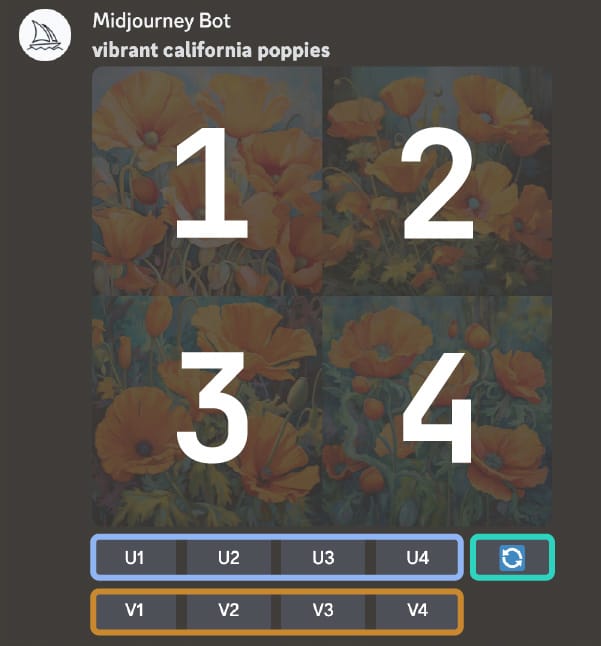
Once the initial image grid has been generated, you'll be greeted with two rows of buttons, each offering unique possibilities. The U1, U2, U3, and U4 buttons allow you to upscale the selected image, creating larger versions imbued with finer details.
Alternatively, the V1, V2, V3, and V4 buttons empower you to explore subtle variations of the chosen grid image, generating a fresh set of options with similar styles and compositions. Additionally, the 🔄 (re-roll) button presents an opportunity to rerun the original prompt, giving birth to a completely new grid of images.
Step 8: Unleashing Creativity: Image Variations and Favorites
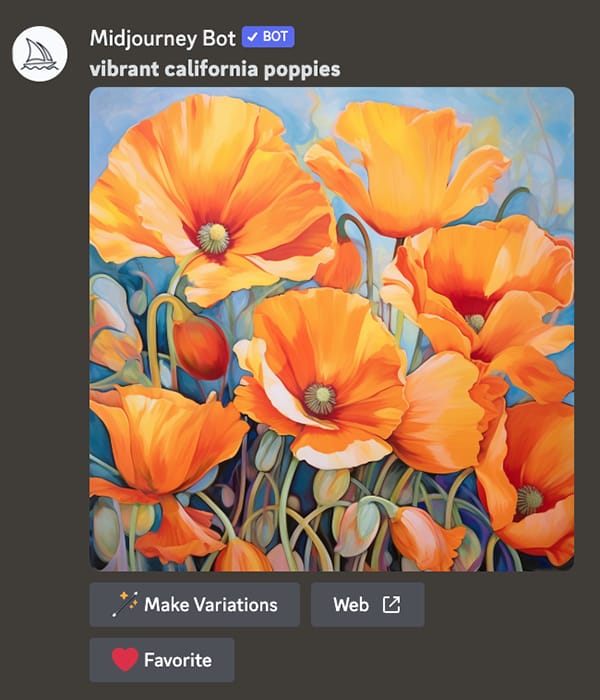
Upon upscaling an image, a new set of options awaits. With the 🪄 Make Variations option, you can dive deeper into creative exploration by generating a fresh grid of four variations based on the upscaled image.
For further management, the Web option enables you to open the image in your gallery on Midjourney.com, providing convenient access to a wealth of creative resources.
To effortlessly curate and access your best images, the ↗️ Favorite button allows you to tag your favorites, ensuring easy retrieval on the Midjourney website.
Step 9: Preserving Your Masterpieces: Saving Your Image
To preserve your carefully crafted image, follow these simple steps. Click on the image to view it in its full-sized glory.
Then, right-click on the image and select the "Save image" option. On mobile devices, a long tap on the image reveals a download icon in the top-right corner, granting you the ability to save it effortlessly. It's
Incorporating the /describe command into your creative process with the Midjourney Bot unlocks a world of possibilities.
This powerful feature allows you to upload an image and receive four thought-provoking prompts inspired by its visual content. Rather than replicating the image exactly, the prompts capture its essence, mood, or elements, encouraging exploration and interpretation.
By leveraging the /describe command, you can expand your vocabulary, explore different aesthetic movements, and unlock fresh ideas. The aspect ratio information provided by the bot gives you valuable insights into the dimensions and shape of the uploaded image, further enhancing your creative journey.

Remember, the prompts generated are meant to inspire and spark your imagination. Feel free to interpret and modify them to align with your artistic goals. Embrace the Midjourney Bot's capabilities and let your creativity soar to new heights.
Bonus Tip: Engage with the Midjourney Community on Discord!
To take your image generation experience to the next level, join the vibrant community of Midjourney's Discord. Connect with fellow business owners, entrepreneurs, and creative individuals who share your passion for visual content. Discover a wealth of ideas, insights, and inspiration that aligns seamlessly with your vision.
Don't miss out on the opportunity to reverse engineer the art of exceptional image generation effortlessly. By engaging with the Midjourney community on Discord, you'll elevate your business's visual content, captivate your audience, and set yourself apart from the competition.
Take action now and dive into Midjourney's Discord community. Unleash the full potential of your image generation journey and watch your creative endeavors thrive.
Remember, your creativity knows no bounds with the Midjourney Bot and the support of the vibrant Discord community. Happy generating and enjoy the remarkable results that await you!
Reply